8/26/2015

杀毒软件 vs 移除恶意软件

 en  <-- Greetings! Click here for English!

 这篇文章是属于在“7个常见对电脑的误解"系列里。 

这两个是什么东西?你应该从小就听过杀毒软件,但是你知道移除恶意的软件是什么吗?很多人说电脑只需要杀毒软件,有些甚至怕安装这两个软件会相撞导致电脑故障。


开始之前,你可以看看这个影片(英文)。他已经解释了大部分我想说的...

首先,什么事病毒和恶意软件?病毒是其中一种恶意软件。它会自己繁殖然后感染整个电脑。恶意软件则是一个概括全部拥有‘恶意’的软件的一个称呼,例如病毒和木马。

所以,我们可以说杀毒软件是用来消除电脑的病毒,移除恶意软件则是用来消除电脑所有的有害软件。所以我们应该只是装移除恶意软件,对吧?

虽然说之前的理论是正确的,但是移除恶意软件是属于新型的扫描器,它们只会扫描比较新的病毒和漏洞。较旧的病毒是由杀毒软件处理的。

因此,我们应该装哪一个?两个都要。(是的)

为了避免软件相撞,你应该把杀毒软件的’实时监控‘模式打开。然后把移除恶意软件的’实时监控‘关闭,并自己每个星期做扫描。


 记住 
恶意软件 - 包括全部种类,例如病毒或木马。
病毒 - 一种恶意软件,会自己繁殖然后感染整个电脑。
杀毒软件 - 你需要一个,并把’实时监控‘打开。用来找你电脑里存在的较出名的病毒。
移除恶意软件 - 你也需要,不过把’实时监控‘关掉,自己每个星期做扫描。用来找你电脑存在的较新病毒。

Antivirus vs Anti Malware!

 zh  <-- 萌萌哒!换去华语!

 This is part of the "7 common misconception about computing" week series. 

What are these? You might heard a lot about Antivirus since younger ages, but Anti Malware seems to pop up quite recently. (For me it is) Many people say their computer only need Antivirus software, and some of them don't install both Antivirus and Anti Malware in their computer because scared of any possible software conflict.


Before I start anything, here's a video that is quite informative for the topic today. Basically what I wanted to say is based on this video.

So, what is virus and malware? Virus is a type of malware. The base function of virus is to duplicate themselves and spread through the whole computer. Malware is a term that includes all types of 'Malicious Softwares', ranging from virus to trojan horse.

Then, it is quite obvious to say that Antivirus is a software use to remove all computer viruses while Anti Malware use to remove all malicious coded softwares in your computer. So should we just install the Anti Malware to do the job?

While the previous statement is true. Anti Malware software is a more updated scanner that look for newer viruses and security vulnerabilities. Some of them do not scan for older well known viruses. To make sure you have security covered everything, you need Antivirus software.

So, which one do you need for your computer? Antivirus or Anti Malware? Basically both. (Yep.)

To prevent the possible conflicts, you should put your Antivirus software in 'Real-Time Protection' mode while turn off the Anti Malware software 'Real-Time Protection' mode and run them manually yourself about once a week.


 Just Remember 
Malware - All kinds of malicious softwares including virus, trojan horse and worm,
Virus - A type of malware, used to duplicate itself and infect the whole computer.
Antivirus - You need one of this on 'Real-Time Protection', it use to find and remove any well known viruses in your computer.
Anti Malware - You need one of this but turn off the 'Real-Time Protection' and run it manually once a week, it use to find and remove any recent discovered malwares that haven't cover by most of the Antivirus software.

8/25/2015

8 Mbps 有多快?

 en  <-- Greetings! Click here for English!

 这篇文章是属于在“7个常见对电脑的误解"系列里。 

让我来问你一个问题。你觉得用1 Mbps来下载1 MB的文件需要多少时间呢?如果你的答案是1秒钟,你错了。

你看见那个大字母B和小字母b吗?他们其实是不同的计算单位来的哦!大字母B代表了Byte (字节),小字母b则代表bit(位元)。

深入一点,1 Byte 等于 8 bits,所以 1 bit 是8分之1个 Byte。

 1 Byte = 8 bits
 1 Kilobyte = 8 Kilobits
 1 Megabyte = 8 Megabits
 ...

所以,问题的正确答案是8秒,因为1 Mbps 等于每秒 1 Megabit。下载1 Megabyte的文件需要8 megabits。因此,想用1秒下载1 Megabyte的文件,你需要 1 MB/s。

头痛了吗?试试这样想:
当你看到Byte,或者是大字母B,你知道他是比较大的数目。当你看到bit,或者小字母b,你知道数目会小一点。

通常广告都不会显示他们的网速为 MB/s,因为如果用比较小的单位,例如 Mbps ,用户会看到 Mbps 的号码比较多,所以他们觉得比较快。


第一个配套可以用1秒下载1 MB的文件,第二个大约0.4秒,第三的则大约0.2秒。

 记住 
1 Byte = 8 bits
Byte 比较大,所以用大字母B
bit 比较小,所以用小字母b
8 Mbps = 1 MB/s

How fast is 8 Mbps?

 zh  <-- 萌萌哒!换去华语!

 This is part of the "7 common misconception about computing" week series. 

Let me ask you a question, how much time does it need to take to download 1 MB large file using 1 Mbps (Mb/s)? If you tell me 1 second, you are wrong.


Notice the capital B and non-capital b, they are both different unit of measurement. The capital B is representing Byte, which the non-capital b represent bit.

To be specified, 1 Byte equals to 8 bits. Therefore 1 bit is 1/8 of 1 Byte.

 1 Byte = 8 bits
 1 Kilobyte = 8 Kilobits
 1 Megabyte = 8 Megabits
 ...

So, the answer to the question is 8 seconds, because 1 Mbps equals to 1 Megabit per second. To download a Megabyte file you need 8 Megabits to download. So, in order to download 1 Megabyte file in 1 second, you need 1 MB/s since it means 1 Megabyte per second.

Confused? Just think like this :
When you see Byte, or capital B, you know it is a bigger value. When you see bit, or non-capital b, you know it would be smaller.

Many internet service providers like to show their internet package in Mb/s or Mbps instead of MB/s or MBps because it would make user confuse and think that the speed is fast, although it's not the case.


You can download 1 MB large file in 1 second with the 10 Mbps plan, ~0.4 second with the 20 Mbps plan and ~0.2 second with the 30 Mbps plan.

 Just Remember 
1 Byte = 8 Bits
Byte is larger unit, use capital B.
bit is smaller unit, use non-capital b.
8 Mbps = 1 MB/s

8/24/2015

增加RAM能加快电脑?

 en  <-- Greetings! Click here for English!

 这篇文章是属于在“7个常见对电脑的误解"系列里。 

有些时候你的电脑跑得很慢,你才发现系统的RAM快用完了。你应该想把你的4 GB RAM的电脑升级去16 GB来加快电脑运行速度吧。

差不多10 GB RAM使用量
首先,你需要知道什么是RAM。RAM的全名是Random Access Memory,华语叫"随机存取存储器"(我不会在这里用这个词的)电脑软件会用它们来暂时储存文件和运程,有需要的时候可以迅速利用那些已储存的文件来运行软件。现代的操作系统会很妥善得处理RAM的分配量,当一些软件需要的时候系统会清空一部分来让给那个软件用。有的时候系统会把RAM里面的文件暂时放进一个叫Page File的地方。

现在,问你自己用电脑来做什么事。上网?公司用途?还是影片制作?

正常来说,用来上网或打字的电脑不需要用多过4 GB的RAM。玩重型游戏的电脑不需要多过8 GB。拿来制作影片或模型设计也只需要大约8 GB。16 GB是给想要玩游戏,却想开大量的网站在后台的用户使用。

所以,有很多RAM不会加快你的电脑,只会让重型软件运行得更顺畅。如果在任何情况下你电脑剩下很多RAM,你其实是在浪费RAM了。

8 GB和16 GB之间的运行速度没什么差别
 记住 
多RAM不代表能加快你的电脑运行速度,除非你运行很多软件。有很多剩余的RAM代表你在浪费RAM。

Can you speed up computer by adding more RAM?

 zh  <-- 萌萌哒!换去华语!

 This is part of the "7 common misconception about computing" week series. 

Sometimes your computer runs pretty slow, then you realized that your RAM are completely used up. You may think that upgrading from a 4 GB to a 16 GB computer would be really useful to you, right? Actually it depends on how you use your computer.

Almost 10 GB RAM usage
Firstly, what is the main purpose of RAM? RAM is called Random Access Memory, computer softwares use them as temporary storage for file and processes so the program could access them immediately when required. Usually modern operating systems will free up the RAM when a program needs more, or move some other files to another temporary storage called Page File.

Now, ask yourself what kind of job are you doing using the computer. Surf web? Office jobs? Or video rendering?

Usually, for user that browse web for information or use computer for office need, you don't need RAM more than 4 GB. For gamers that play games like GTA 5 or Battlefield 4, you would need no more than 8 GB. If you use computer for video editing or graphic design, you still don't need more than 8 GB either, 16 GB don't give much benefits. But if you are a professional multitasker, like playing games while wanted to open a lot of tabs on the background, you may consider 16 GB.

Keep that in mind, having more RAM doesn't speed up your computer, they'd just speed up your current working softwares speed. If you have a lot of RAM left unused at any situation, you are wasting your money for RAM.

Nothing much is changed between having 8 GB and 16 GB

 Just Remember 
More RAM does not equal to faster performance, but only when computer is running multiple programs. Leaving more RAM means that you are wasting it.

8/23/2015

1000 或 1024?

 en  <-- Greetings! Click here for English!

 这篇文章是属于在“7个常见对电脑的误解"系列里。 

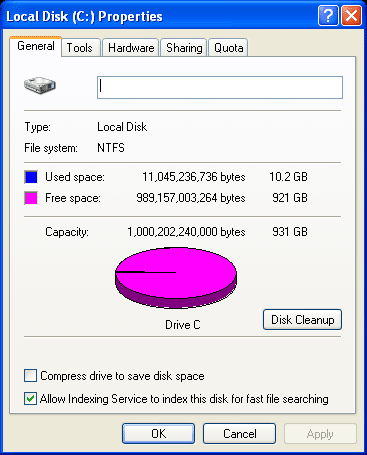
有没有试过你买的1 TB硬碟,装进去电脑却显示931 GB罢了?
小时候的电脑课教你“1 Gigabyte等于1024 Megabyte”。其实这个是错误的想法。(你老师骗了你!)1 Gigabyte其实是1000 Megabyte而不是1024。1024 "Megabyte"其实是叫做”Mebibyte“,但是很多人喜欢把"Megabyte"和"Mebibyte"混在一起用。

"Mebi"其实是用"Mega"和"Binary"合在一起组成的字。所以,"Gibi"是"Giga"和"Binary","Tebi"是"Tera"和"Binary",以此类推。

虽然是公用的词语,但是很少会用在字节计算。微软的Windows操作系统却是用这个计算文件大小,就算是在Windows 10。Windows用Mebibyte来读取文件大小,却显示为Megabyte。打个比如,Windows将1024 KB的文件读成1 MB,或将1000 KB,或1 MB的文件显示为"976 KB"。这个显示方式的确混淆了很多用户。

这个是1 TB的硬碟,却显示931 GB...

Megabyte是显示MB,而Mebibyte是MiB。

 记住 
1000 - Kilo, Mega, Giga, Tera 等等
1024 - Kibi, Mebi, Gibi, Tebi 等等
MB - Megabyte
Mib - Mebibyte

1000 or 1024?

 zh  <-- 萌萌哒!换去华语!

 This is part of the "7 common misconception about computing" week series. 


Ever wonder why the storage device you bought is 1 TB, but when installed into your computer it shows about 931 GB?

In computer class you might heard that "1 Gigabyte is equal to 1024 Megabytes", this is actually incorrect. (Your teacher had been telling you the wrong thing!) 1 Gigabyte actually equals to 1000 Megabytes, not 1024. The 1024 "Megabytes" is actually another unit called "Mebibyte", but many people just like to use them both interchangeably.

The prefix "mebi" is actually a combination of words "mega" and "binary". In this case, "Gibi" is from "giga" and "binary" while "Tebi" is from "tera" and "binary", and so on.

Despite on it's official status, it is not commonly used on reporting byte counts. It is used on the well known Microsoft Windows OS, even till Windows 10. Windows reads the file size in Mebibytes, but show the file size on screen as Megabytes. For example, Windows reads a 1024 KB file as "1 MB", or "976 KB" when it is 1000 KB or 1 MB, which causes some confusion.

This Hard Disk is actually 1 TB, but only showing 931 GB...

The unit resemble Megabyte is MB while Mebibyte is MiB.

 Just remember 
1000 - Kilo, Mega, Giga, Tera and so on
1024 - Kibi, Mebi, Gibi, Tebi and so on
MB - Megabyte
Mib - Mebibyte

8/17/2015

[Easy] Play pirated Minecraft

 zh  <-- 萌萌哒!换去华语!

Disclaimer : This tutorial was meant for demonstration purposes.

A big shout out to my friend KohGeek for this tutorial.

1. Download this file. (I will call this as Minecraft Version Downloader.)
- .exe is recommended.

2. Create a Minecraft Account.
- This is a free registration.
- Remember to verify your registration in your email Inbox or it won't work.

3. Open up your Minecraft Version Downloader. You shall encounter this login screen.


- Enter the Email Address you registered on Mojang website along with your password. 

4. After you login this is what you will see.
- Don't get shocked with the Play Demo.
* You may download other version by clicking the Edit Profile button.
Stuffs in Edit Profile


* You can logout by clicking on Switch User.

5. Click on Play Demo and wait. When the game launched, close the Minecraft Version Downloader.
- You may play demo world by clicking the Play Demo World button.
- Press Options to adjust your settings.

6. Now, download Mineshafter for another launcher. (I call it Minecraft Launcher)
- You don't need to register here.

7. Launcher the Minecraft Launcher. You will see this screen. Press Switch User.

8. Here, type any username in the Username section. (Use the username if you registered a Mineshafter account.), Password can be typed randomly.

9. Press Play and done!

10. Press Single Player and make your own world!

- Minecraft Realms will not work.
- Press Options > Language to change language, or press the Globe icon beside Options.

Some of you will ask, why don't we just download Minecraft versions using the Mineshafter Minecraft Launcher? This is due to the Mineshafter is a cracked launcher, the connection to server won't authenticate the download.

[简单] 盗版玩当个创世神

 en  <-- Greetings! Click for English tutorial!

警告:本教程属于示范教学。

特别感谢KohGeek~

1. 先下载这个。(我把它叫做Minecraft Version Downloader)
- 建议下载.msi的。

2. 做一个Minecraft Account
- 不需要钱的,不用担心。
- 记得要去你的Email Verify你的Account,不然行不通哦。

3.  把你所下载了的Minecraft Version Downloader打开。你会看到类似这个的窗口。


- 把你Register的Email Address (Mojang) 输入进去,然后打你Account的密码。

4. Log In后你会看到这个窗口。


- 不要被Play Demo吓到!
*你可以用Edit Profile下载其他Version。
Edit Profile里面的东东


*你们可以用Switch User来Log Out

5. 按Play Demo,等你们下载完后会被带到这里。你们可以关掉它了。


- 你们也可以按Play Demo World来试玩。
- 按Options来调整你的设置。

6. 现在,去Mineshafter来下载另外一个Launcher。(我把它叫做"Minecraft Launcher)
- 在这里,你可以不用Register东西

7. 把Minecraft Launcher打开,你应该会看到这个,按Switch User。


8. 这个时候,在Username随意打一个名字(如果你在Mineshafter register了就用回那个名字),Password可以随便打。


9. 按Play就完成了啊~!


10. 按Single Player自己做一个世界玩吧~


- Minecraft Realms用不到。
- 按Options > Language 来调你的语言,或者按Options旁边的地球按钮。

在此,为何我们不直接用Minecraft Launcher来Download Minecraft呢?
因为Minecraft Launcher不是Premium的,所以绝对下载不到。