8/30/2015

各种的行动通讯时代

 en  <-- Greetings! Click here for English!

你有想过电话讯号旁边的 E 代表什么意思吗?


2G (第二代,2nd Generation)
这是第二代的行动通讯。这一代传送的是数码讯息。

a) GPRS (General Packet Radio Service) 
这个是比较少人用的行动通讯种类,有人称它为2.5G。

b) EDGE (Enhanced Data rates for GSM Evolution) [E]
这个比较多人用。EDGE讯息传送率会比之前的快,最高速为1Mb/s。有人称它为2.75G。

3G (第三代,3rd Generation)
这是第三代的行动通讯。这一代的讯息传送速度最低可达到0.2Mb/s。3G的安全性比2G高。3G也用在很多服务,例如全球定位系统 (GPS)和手机电视。

a) HSPA (High-Speed Packet Access) [H]
- 是HSDPA和HSUPA的结晶品。
- 被称为3.5G
- 双载波(Dual-Carrier)版的HSPA可以让用户同时连接去两个通讯塔,加快网络速度。
- 多载波(Multi-Carrier)版的HSPA可以让用户同时连接去多个通讯塔,加快网络速度。
- 升级版的HSPA是HSPA+。

b) HSDPA (High-Speed Downlink Packet Access)
这是加强版的3G网络下载,双载波(DC-HSDPA)能够让用户同时连接去两个通讯塔,加快网络速度。

c) HSUPA (High-Speed Uplink Packet Access)
这是加强版的3G网络上载,双载波(DC-HSUPA)能够让用户同时连接去两个通讯塔,加快网络速度。

d) HSPA+ (Evolved High-Speed Packet Access) [H+]
这是HSPA的升级版,他的下载速度可达到 ~168Mb/s,上载可达到 ~22Mb/s。这个可以被称为3.75G。

LTE(長期演進技術,Long Term Evolution)
进入4G之前,你应该听过LTE。有些网络公司的LTE属于4G。网络公司很喜欢把"4G"的词加入他们的“LTE”配套里,虽然网速根本不符合4G的标准。因为如此,有人叫它为3.9G或"前4G"。

4G (第四代,4th Generation)
这是第四代的行动通讯。有些网络公司比较喜欢称LTE为4G,虽然有些LTE的速度还没符合4G的标准。正真的4G速度需要达到1Gb/s下载速度给没有移动的用户,或者100Mb/s给在移动的用户。

LTE-A (長期演進技術升級版,Long Term Evolution Advanced)
这个才是正真的4G,下载速度高达1Gb/s。

5G (第五代,5th Generation)
5G计划会在2020年面世。不久之前,5G开发者成功研发1Tb/s的下载速度,这是现在的网速的千多倍!

旧款年代
a) 0G (第零代,0th Generation)
移动数据出现之前,封閉無線電話就是0G。技术例如Push-to-talk (PTT)都是拿来拨点的。这些电话通常连接去汽车上。

b) 1G (第一代,1st Generation)
第一代的都是使用模擬信號(Analog)来传送资料。日本的一家通讯公司Nippon Telegraphy and Telephone (NTT)在1979年推出1G,并成功在5年内将此科技发展到全国。

Types of mobile phone generation

 zh  <-- 萌萌哒!换去华语!

Ever wonder what does the E means beside your phone signal strength?


2G (2nd Generation)
This is the second generation of wireless technology. 2G radio signal are digital.

a) GPRS (General Packet Radio Service) 
This is 2G but implemented with a packet-switched domain in addition to the circuit-switched domain. This mobile generation is dubbed as 2.5G

b) EDGE (Enhanced Data rates for GSM Evolution) [E]
This is still widely used around the world. EDGE have a better data transmission rates than previous versions of 2G, with maximum speed of 1 Mb/s. EDGE is dubbed as 2.75G

3G (3rd Generation) [3G]
This is the third generation of wireless technology. The minimum speed can be achieved through 3G is about 0.2Mb/s. 3G networks offer a better security than 2G. 3G is also used in variety of services like GPS and Mobile TV.

a) HSPA (High-Speed Packet Access) [H]
- HSPA is the combination of both HSDPA and HSUPA.
- Dubbed as 3.5G.
- HSPA can be upgraded to Dual-Carrier, which allows user to connect to 2 cell tower at the sametime to double the speed.
- There is also Multi Carrier HSPA connection, which will enhance the speed even further than Dual Carrier.
- The upgraded version of HSPA is HSPA+.

b) HSDPA (High-Speed Downlink Packet Access)
This is the improved version for downloading in 3G. Dual Carrier (DC-HSDPA) can help boost the download speed even further by connecting the mobile to 2 cell tower at the same time.

c) HSUPA (High-Speed Uplink Packet Access)
This is the improved version for uploading in 3G. Dual Carrier (DC-HSUPA) can help boost the upload speed even further by connecting the mobile to 2 cell tower at the same time.

d) HSPA+ (Evolved High-Speed Packet Access) [H+]
This is the improved version for HSPA. It delivers high download speed up to ~168Mb/s. and 22Mb/s for upload speed. This can be dubbed as 3.75G.

LTE (Long Term Evolution) [LTE]
Before proceeding to 4G, you might heard about LTE. LTE is actually NOT 4G. Carrier always like to market their LTE as 4G LTE which confuses the customer that they are using 4G. Because LTE doesn't meet the requirement speed to be called as 4G, it is referred as 3.9G or Pre-4G.

4G (4th Generation) [4G]
This is the forth and latest generation of wireless technology. Some carrier refer the LTE as 4G, although LTE speed doesn't reaches the speed that can counted as 4G. To be qualify as a 'True 4G', the download speed for stationary user must reach 1Gb/s or 100Mb/s for moving users.

LTE-A (Long Term Evolution Advanced)
This is the so called 'True 4G' as it's peak download speed reaches 1Gb/s.

5G (5th Generation)
5G is planned to be roll out on 2020 for consumer usage. Not long ago, 5G researchers had broke the record super fast speed of 1Tb/s download, which is thousand times faster than the maximum internet speed nowadays.

Older Generations
a) 0G (0th Generation, Pre Cellular)
Before cellular connection exist, a mobile radio telephone is used. Technologies available in this generation are Push-To-Talk (PTT) and Mobile Telephone Service which acts like land line. These phone are usually attached and used in cars and trucks.

b) 1G (1st Generation)
This generation uses analog to transmit data from tower to user. It is launched in Japan on 1979 by Nippon Telegraph and Telephone (NTT) and become the first nationwide 1G network on 1984.
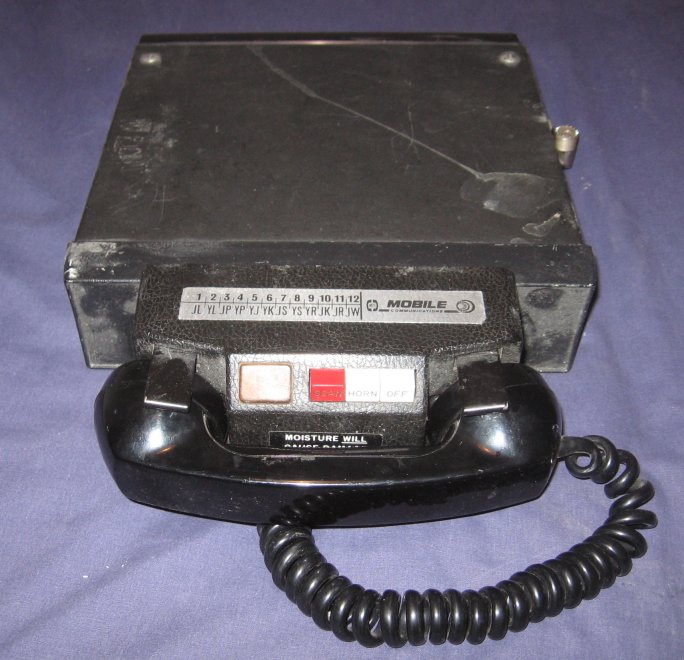
A mobile radio telephone.

8/29/2015

其他的电脑误解

 en  <-- Greetings! Click here for English!

 这篇文章是属于在“7个常见对电脑的误解"系列里。 

当然还是有很多误解,这里有几个比较出名的。


1. 蓝屏是病毒造成的
不是全部都是病毒闯的祸。有问题的驱动,设置或者系统超载都可能会造成蓝屏。

2. 电脑慢是病毒的问题
背后有很多运行程序也会导致电脑慢。如果你的硬碟有很多文件,或者有文件碎片,你的电脑运行速度也会被拖慢。(有足够的RAM可以解决这个问题)

3. Hacking (入侵) 和 Cracking (破解)
Hacking和Cracking有分别。Hacking是寻找电脑漏洞入侵进去的一个举动,而Cracking是破解某个软件或电脑密码的一个举动。通常Hacking是建设,而Cracking则是破坏的举动。

4. Mac 的操作系统不会中病毒
会,只是那个系统比较少人用,所以很少病毒制造者去制造Mac的病毒。

5. 电话的杀毒软件
除非你越狱或Root了你的电话来装其他东西,你不需要电话的杀毒软件。

6. 在 I.T. 工作的都是程序员
I.T. 可以包括很多领域,例如网络,修理电脑及编写软件。

7. 我没安全移除驱动,结果Pendrive中了病毒
安全移除驱动不会让你的Pendrive中毒,但是会损坏你的文件。


"7个常见对电脑的误解"就到此结束啦!谢谢支持!

Other minor misconceptions

 zh  <-- 萌萌哒!换去华语!

 This is part of the "7 common misconception about computing" week series. 

Of course, there are still a lot of misconception around the computing topic, here are a few famous ones.


1. Blue Screen of Death is caused by virus
No, not all of them are. Some virus will infect the system and cause system to halt. But sometimes a malfunctioning driver, change of settings or system overloaded can also cause BSOD.

2. Slow computer is virus's fault
Having too much program running in background could be a case too. Having too much files in your hard disk or fragmented hard disk can even drag down your computer performance. (Having enough RAM can solve this)

3. Hacking and Cracking
Hacking is an act that looking for vulnerabilities or 'holes' in a system and attempting to access it. It is not same as cracking, which is an act by trying a variety of passwords in order to access an account. Some definition say that hacking is more to a good 'building' side while cracking is for malicious purposes.

4. Mac OS can't get virus
It will, but the virus creators have no interest to create virus for Mac OS since the OS is not widely used.

5. Phone Antivirus
Unless your iOS is jailbroken, or rooted for Android, you don't need antivirus protection.

6. Anyone who working for I.T. is a programmer
I.T. can be mean a lot of aspects such as networking, computer repair, programming etc.

7. My pendrive infected by virus because I didn't safely remove it
Safely remove device doesn't protect you from viruses, it protects your file from being damaged.


This conclude the "7 common misconception about computing" series! Thanks for supporting!

8/28/2015

[简单] 检查你的电脑性别?

 en  <-- Greetings! Click here for English!

您知道你的电脑其实是有性别的吗?如果不知道你就现在试试这个教学!

制作阅读文件
1. 打开Notepad
2. 输入CreateObject("SAPI.SpVoice").Speak"Hello"
3. 保存您的文件在Desktop(桌面),File Name(文件名)为Gender.vbsSave as type(文件种类)为All Files
4. 在你的桌面开启Gender.vbs来查看!

建议:你可以自己改掉你想要电脑读的词!

后语
恭喜你如果你的电脑是女的!(如果你是男的) :3

[Easy] Check your computer's gender?!

 zh  <-- 萌萌哒!换去华语!

Do you know that your computer have a gender? If you don't then you should check it out!

Creating the test file
1. Open Notepad.
2. Type in CreateObject("SAPI.SpVoice").Speak"Hello".


3. Save the file in your Desktop, for the File name type it as Gender.vbs, change the Save as type to All Files.


4. Run the Gender.vbs in your desktop and listen!

OPTIONAL : You can actually edit the text to the one you like!

Final Words
Congratulation if you get a girl voice (If you are a boy) :3

CPU或Casing?

 en  <-- Greetings! Click here for English!

 这篇文章是属于在“7个常见对电脑的误解"系列里。 

你电脑老师是不是告诉你连接去屏幕的’大黑箱‘叫CPU?你的电脑老师又骗人啦!


CPU英文全名叫Central Processing Unit,中央处理器。

CPU是电脑的内核,有时候被叫做Processor(处理器)。它的工作是用来处理你给的指示。当他Hertz越高,或速度越快,短时间处理的指示越多。CPU很像一个正方形的饼干,大约是2寸。

那么那个‘大黑箱’呢?它叫做Computer Case(机箱),有人也叫它Computer Chassis和System Unit。它用来保护电脑的零件并将它们关闭在一个小小的空间。它通常是用钢来做的。


(被骗的就在下面选择“实用”,来看看多少人被骗了)

 记住 
CPU是Central Processing Unit(中央处理器),有时候会叫做Processor(处理器)。它大约是2寸长。
那个连接去屏幕的大箱子是叫Computer Case(机箱)。

CPU or Casing?

 zh  <-- 萌萌哒!换去华语!

 This is part of the "7 common misconception about computing" week series. 

Have your computer class telling you that the 'big black box' connected to your Monitor is called CPU? Because your computer class teaches the wrong thing again!


Let see what is the full name of CPU: Central Processing Unit. 

CPU is the core of a computer, it can be referred as Processor. The job of a processor is carry out any commands given by you. The higher the hertz, or speed, the more instruction can be carried out in a shorter amount of time. CPU looks like a square, it is about 2 inches long.

Then, what about that 'big black box'? It is called a Computer Case. You may call it a Computer Chassis or System Unit too. It protects the important components and enclose them in one place. They are usually made out of steel.


(If you been having the wrong knowledge until now, go down there and select "Useful", let's see how much people had been knowing the wrong stuff)

 Just Remember 
CPU is Central Processing Unit, it can be called as Processor. it is about 2 inches long.
The big box that everything connects to it is called a Computer Case.

8/27/2015

文件恢复行得通吗?

 en  <-- Greetings! Click here for English!

 这篇文章是属于在“7个常见对电脑的误解"系列里。 

记忆是永久的,就像你的硬碟里的文件。所以好莱坞里的戏看到那些人恢复文件是行得通的。


Piriform弄了一个软件叫Recuva。它能够恢复你所删除的电脑文件。只需打开扫描,你删除的文件就统统出来了。

为什么能行得通呢?操作系统删除文件的方式很特别,他们只删除文件‘指令’,所以原有的文件编码还在硬碟里。这样就像把一本书的目录撕掉,可是内容却还在,只是比较难找回内容罢了。

文件恢复软件就是把文件’指令‘恢复掉,把书本的目录再写过一次。只要删除了的文件越少被新文件铺盖,文件恢复的成功率会越高。

如果文件可以被恢复,那么要如何避免呢?你能够一直写入大量的新文件进去你的硬碟,覆盖掉旧的文件资料。你也能用Piriform制作的CCleaner,用他们的Disk Wiper功能来清理硬碟。你也能用他扫描器,并开启Wipe MFT Free Space功能来达到同样效果。


 记住 
文件恢复是可以的,只要文件被删除后立刻实行恢复。
很多软件能恢复文件,也有很多能干净清除掉文件。

Is file recovery possible?

 zh  <-- 萌萌哒!换去华语!

 This is part of the "7 common misconception about computing" week series. 

Your memory is eternal, and so does your files in the hard disk. Therefore it is quite possible to recover files from a hard disk just like how Hollywood teaches you.


Piriform have a pretty useful tool that allows user to recover all the files upon deletion. The recovery step is pretty simple, just fire up the software and allow it to scan. Your old files are showing up again.

How could that possible? The way operating systems usually delete a file is remove a 'pointer' that points the file to a chunk of codes in your hard disk. It's like tearing up the index of a book so it would be harder to search for a specific chapter.

File recovery is the way to rebuild the 'pointer' by looking for the chunk of codes. It's like rewriting the index for that book. The lesser the old data is covered by the new ones, the higher chance of data recovery.

If a file recovery is possible, what are the safety ways to completely remove the files from your hard disk? First off, you can just keep copy files into the hard disk you want the data to be 'forgotten', this will cover up the old data chunk per chunk and the old data will gone or at least to the state of unrecoverable. Or, you can use CCleaner (From Piriform) to remove the old data. You may use their Disk Wiper feature or use the scanner with Wipe MFT Free Space enabled.


 Just Remember 
File recovery is possible, if you do it immediately after deletion is done. 
There are a lot of software that can help you to recover files, and software to wipe out the files.